Rows: the homepage that isn't a homepage
Most SaaS sites spend their homepage explaining the product. Rows skips that entirely and drops you straight into the app at rows.com - and they have the A/B test data to back it up.
Skip the homepage if the product can sell itself in 10 seconds
rows.com lands you inside the app - no marketing page. Marketing Examples reports an A/B test showed this lifted conversion. Works when the product is freemium, well-known, and self-explanatory. Probably doesn't work for everything.
Templates as a use-case explainer
Their template gallery doubles as the answer to 'what can I do with this?' Visitors browse templates and discover 30 jobs they didn't know the tool could do. Cheaper than writing 30 feature pages.
Make the integration sources visible early
Notion, Google Analytics, HubSpot, Facebook, Instagram, LinkedIn, YouTube logos right on the homepage. For a data/sheet tool, 'can it pull from where my data already lives?' is the first question - answer it before anyone asks.
Footer that visually echoes the product
The footer is laid out like rows and columns - same as Google Sheets or Excel. Small detail, but it reinforces what the product is at the very moment a visitor decides to stay or leave.
The product page IS the marketing page
rows.com/product is what most sites would call the homepage. The split lets them have it both ways: product-led entry for everyone, and a full marketing surface for people who want context.
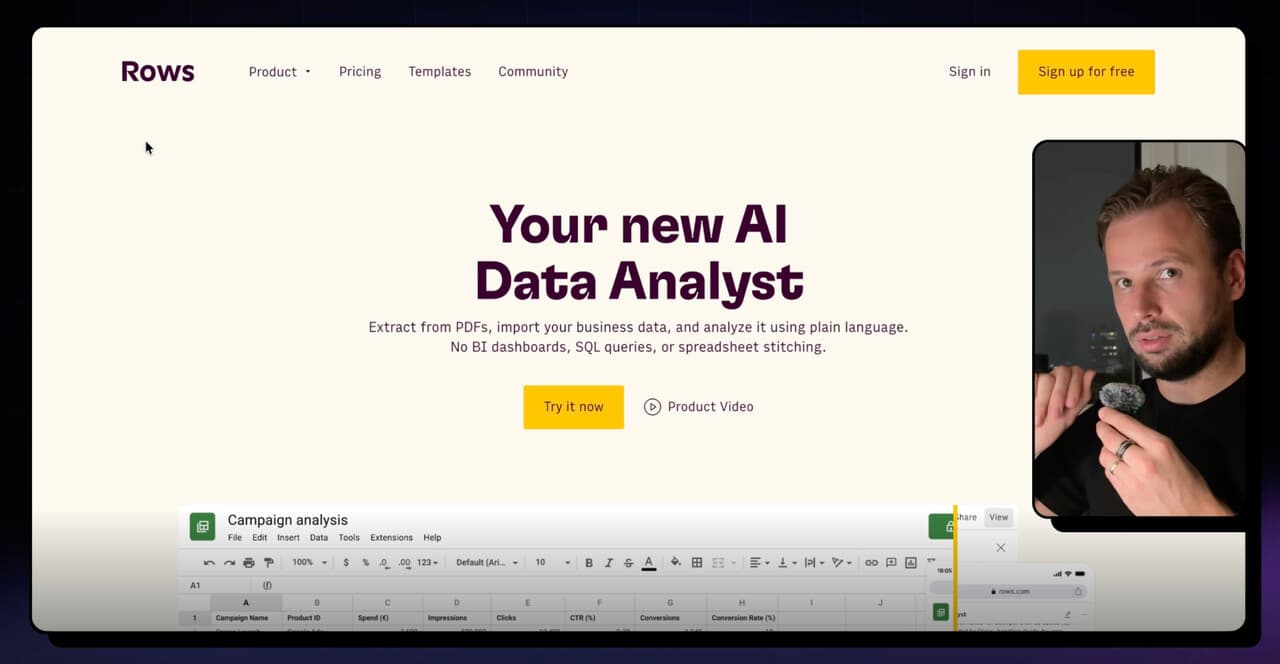
Hey, hey, welcome back. Time for another web review. This time I selected the website of a product called Rows. It's basically a spreadsheet tool with an AI layer on top - so you can drop in your spreadsheets, a lot of data and information, and then do a lot of different things with that same information that a normal Google Sheet or Excel wouldn't allow you to do. Interesting product, definitely worth checking out. But their website is pretty interesting - there's one really controversial or really fascinating thing they're doing. I'm going to get to that at the end. Let's jump into the website.
In general the homepage is really good. What I like about the hero - this dynamic part already shows that you have a normal Google Sheet, but Rows can do quite a lot of interesting stuff with it. AI analyze, that kind of thing. That works well.
This next section is also really good - it directly shows the features or benefits that this tool helps you do. Well done. This is a really important part. I like the visuals - because when you think about databases or sheets, you want to make sure you can pull in your information. And you can already see that from Notion, from Google Analytics, HubSpot, Facebook, Instagram, LinkedIn, YouTube. You can see you can pull in information from so many different sources. This is good.
What I really like: on the homepage they're also showing many different templates. Plus they have a separate templates page. Why this is actually really good: they're taking away the learning curve. You can kickstart your project quite easily. Plus the even bigger benefit - you can quite easily see all of the use cases that Rows is really good for. You don't need to start thinking from scratch about what you can do. You can already see social media stuff, SEO stuff. Plus there's a fully separate page where you can explore all of that. Quite smart and super useful for customers to understand what they can do with the product.
I like the footer a lot - rows and columns just like Google Sheet or Excel. That's a smart move.
Pricing page. Looks solid. Quite easy to understand. Not too much information. Again I like how they've used the sheet layout here and design. So that's okay.
Templates - as I mentioned, there are a lot of them, and you can see so many different use cases. Lots of marketing, SEO, social media-related, sales. This is really good - potentially very helpful for a visitor who's starting out with the tool.
Now coming back to the controversial part I mentioned about the homepage. In theory, this is actually not their homepage - because if you check the URL, it's rows.com/product. So it's their product page, but not their homepage. If you go to your browser and type in rows.com, you're actually going to land inside of the product. So if you go directly to rows.com there's no homepage. You cannot see or read anything else. You're going to land directly inside their app, you can start exploring. There's actually one template already created for you, where you can quite easily decide if you want to drop in your CSV, PDF, do the integrations - maybe there's a ready-made template you want to use.
If you start using it for a bit, it'll prompt you: hey, you should create your account, and then you can do more stuff. Which can be a really smart way, because from the get-go you're giving people the opportunity to try out the product - no need for extra information. At the same time, I'm quite worried that this takes away the moment for people to actually understand what the product is about, read about it a little. It kind of means that whoever lands on rows.com has to already know about the product, otherwise they can be really confused. But if they land inside the app, they should already expect: okay, this is a database product that can enable them to do quite a lot more.
I found an article from Marketing Examples by Harry where they say they actually A/B-tested this, and it increased conversion quite a lot. So you basically skip the homepage and direct people straight into the app. Interesting - I wouldn't have thought that. But this might work for some companies and not for others. Rows is freemium, people might already know it, market is quite huge. So it's really interesting in that sense. Keen to hear your opinions - if you've seen a similar approach. Airtable did it at some point: if you're already a user, their homepage leads directly into the app. But I haven't seen too much of even non-users landing inside the app instead of a homepage. They basically moved their homepage to the URL rows.com/product.
Otherwise the homepage is really good, design-wise really neat. It gives all the information you need - there are no real open questions about what the product does, how it works, how you connect it, what the pricing is. Everything is here. But yeah, homepage versus in-app thing is really interesting. It would be nice to actually know more about it: how well does it work, what are the nuances, why does it work for them, maybe it doesn't work for some audiences or ICPs. Pretty interesting - one thought to share. Let me know what you think. Until next video.